This is CoderPad Connect, our monthly round-up of what's new across the product, what we're seeing in hiring, and ways to get more out of CoderPad.
October's updates help your team see more of each candidate's real work and spend less time on admin. Interviewers can arrange the Interview pad the way they work, every ended interview now comes with an evidence-backed report, and Greenhouse shows each candidate's Screen progress without anyone checking two systems.
What's new in product
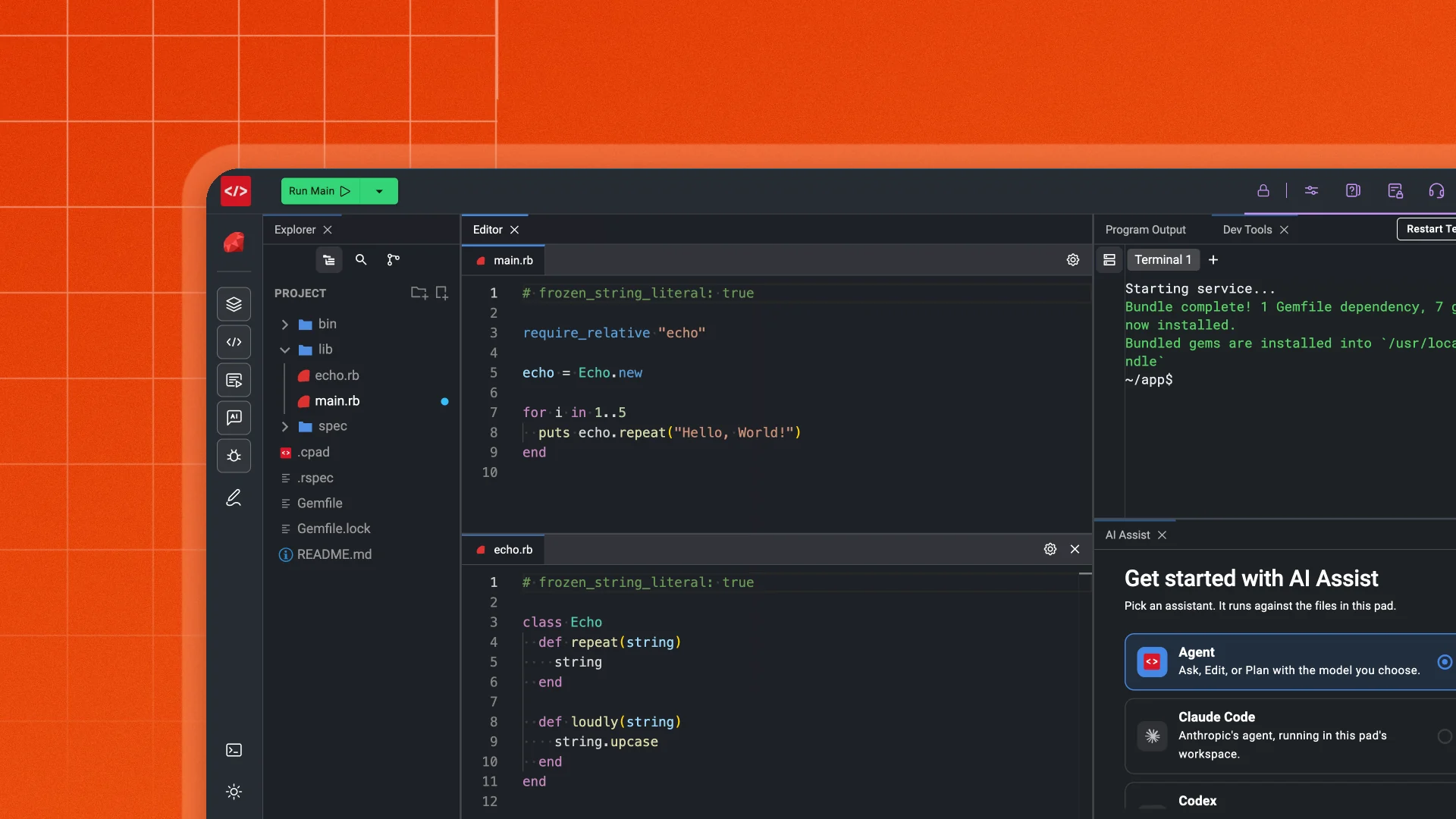
The biggest change in October is the Interview pad itself: interviewers and candidates can now arrange it the way they work.
Arrange the Interview pad the way you work
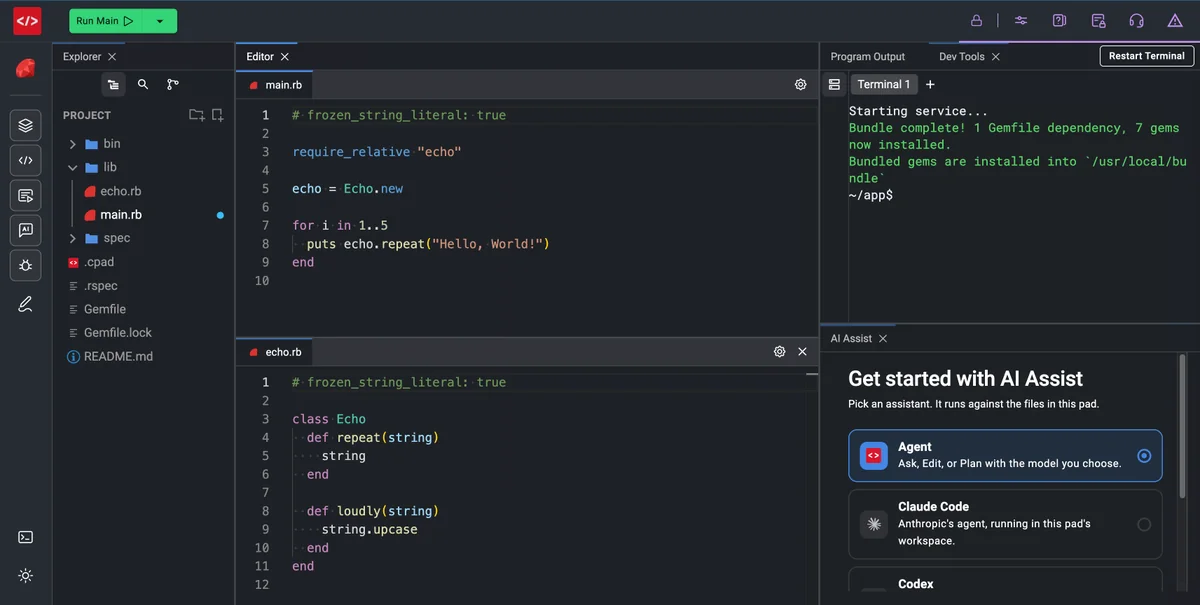
Every pane in the Interview pad can now be dragged, docked and stacked, much like VS Code, so the code, the instructions and AI Assist sit where each person needs them. On a small screen, close what you don't need. Prefer the classic everything-in-tabs layout? It takes about five seconds to get back.
Why it matters
Candidates work in a setup that feels like their own editor, so you see how they really work, and interviewers keep their notes and tools in view. Movable panes are on for every Interview customer, with nothing to switch on.
How it worksHide details
- Split Drag a pane to an edge to sit it side by side or top and bottom.
- Stack Drop it on another pane's tab bar to group them as tabs.
- Resize Drag the dividers to give the active task more room.
- Drag a pane's tab, or a whole group, to an edge to split the screen side by side or top and bottom.
- Drop it on another pane's tab bar to stack them, and drag the dividers to resize.
- Close the panes you don't need and bring them back from the left rail.
- Your layout is saved in your browser, so reloading the page keeps everything in place.
- When you follow the candidate, you see their layout, and your own is waiting when you stop.
One ask this month: share this with your interviewers and hiring managers, not just your admins. They'll notice the new layout first, and the fastest way to make them comfortable is to tell them they can change it.
Share with your teamMore new features
Six more updates shipped across Interview and Screen in October.
Interview reports, ready minutes after every interview
Skip the hour of write-ups after each interview. Every ended pad now opens on a Review page with an Interview Summary and one more report picked for that session, such as a Code Review or an AI Usage report, ready within minutes. Every claim links to the moment in the interview it came from, so your team decides on evidence, not memory.
More detailsHide details
- The whole interview, not just the final code: reports draw on the transcript, code history and final files, AI Assist chats, drawing, uploads and the event timeline.
- Evidence you can check: every claim links to the moment in the interview it came from.
- The report you need: ask for one in plain language, like "Review how the candidate handled the access-control bug" or "Summarize communication for a non-technical hiring manager".
- Answers on demand: ask the Review Assistant anything, such as "Where did they get stuck?", and add its answer straight to a report.
- Everything in one place: playback, transcript, drawing, interviewer notes and files stay on the Review page, along with Interview Coach feedback for the interviewer.
- Reports where you work: download them as PDF or Markdown, or pull them into your ATS.
GET /pads/{id}returnsreview_reports[]for the pad owner, andcoderpad pads reportsdoes the same from the CLI.
Your team makes the call: reports show the evidence, in the same shape for every interviewer. They never recommend, rank or reject candidates.
Build Screen into your own hiring workflow
Create tests, questions and projects through the Screen API, and pull each candidate's results and process data into your own systems, so your team can review and report without exporting by hand. Available to every customer with API access.
More detailsHide details
- Set up at scale: create tests, questions and projects from your own tools.
- Results by question: see how every candidate did on each question.
- How they worked: get candidates' AI Assist conversations and playback events, including pastes, typing speed and time away from the test.
See every candidate's Screen progress in Greenhouse
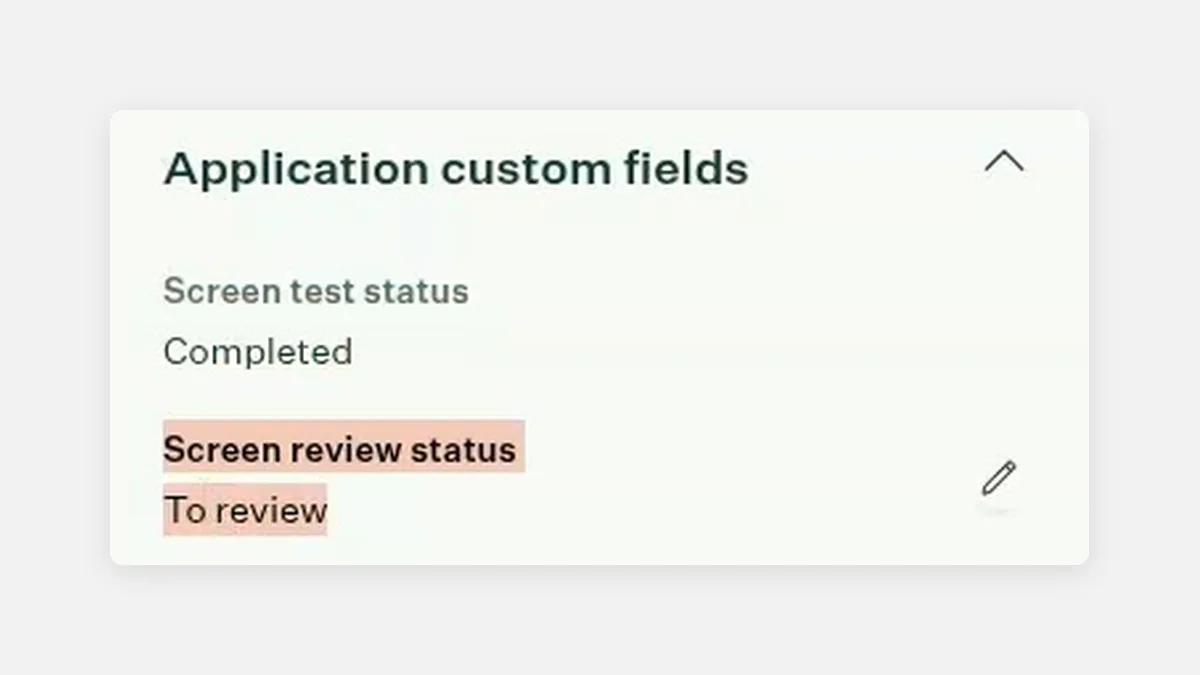
Recruiters no longer need to switch tools to know where a candidate stands. Screen now adds "Screen test status" and "Screen review status" to each Greenhouse application and updates them as the candidate starts, finishes and gets a decision.
More detailsHide details
- Test status: shows when the test is sent, when the candidate starts and when they finish.
- Review status: shows whether a test is waiting for review, then the pass or reject decision, whether a reviewer made it or an automation did.
To turn it on: a Greenhouse Site Admin connects Screen from the Greenhouse page in your CoderPad integration settings.
AI Project Creator generates better custom tests
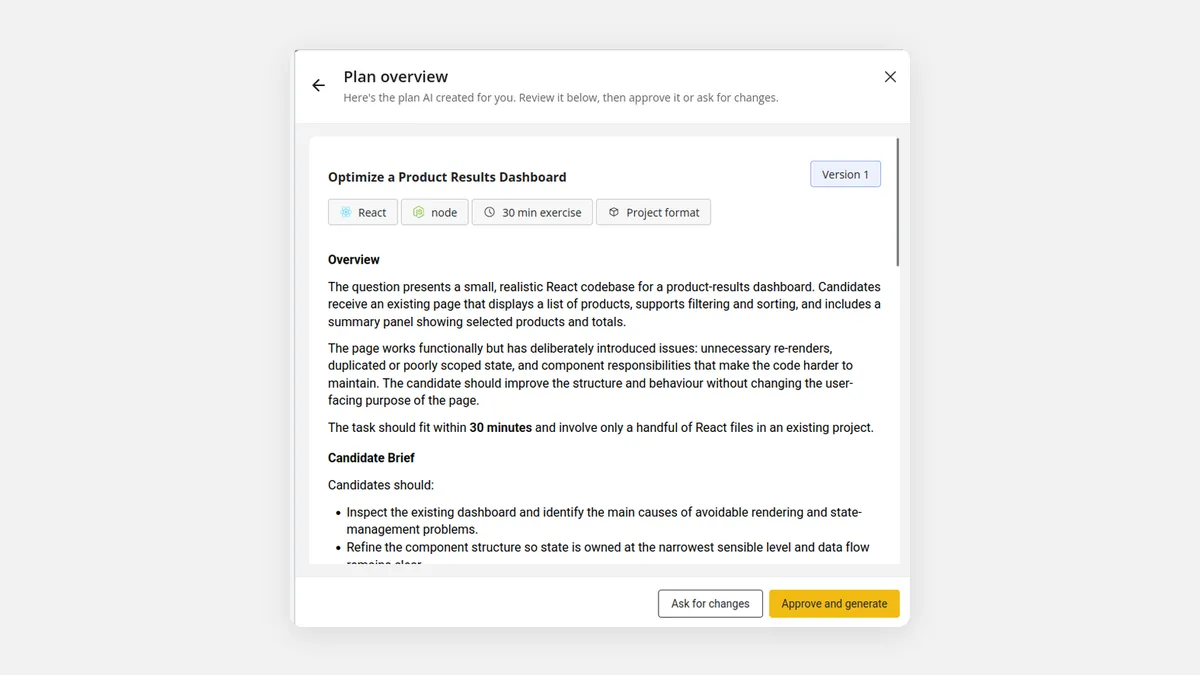
Get a realistic project sized for the time you have. Review the AI's plan, ask for a longer or shorter project, say 60 minutes instead of 30, and generate it in English, French or Spanish while you keep working.
More detailsHide details
- A shorter form: describe the skill, difficulty and length first, then pick the language and the team that can edit it.
- Right-size it: ask for a 30, 45, 60 or 90-minute project, and the plan is rewritten to fit.
- Your candidates' language: generate the project in English, French or Spanish, even from English instructions.
- Every version kept: each change saves a new plan version, so you can go back and approve an earlier one.
- No waiting: projects generate in the background, and a banner on your Questions page links to each one when it's ready.
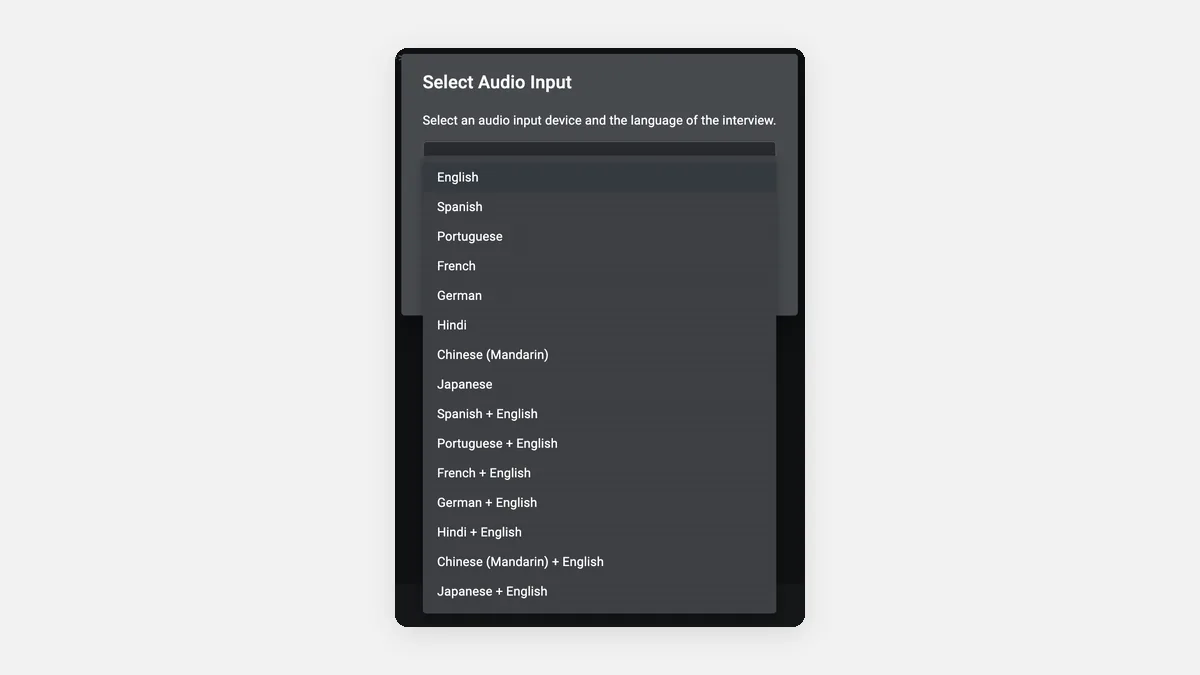
AI Notetaker now transcribes interviews in eight languages
Run interviews in the candidate's language and still get clear notes. AI Notetaker now transcribes English, Spanish, Portuguese, French, German, Hindi, Mandarin Chinese and Japanese, and each of them mixed with English. The interviewer picks the language when transcription starts and can switch it at any time.
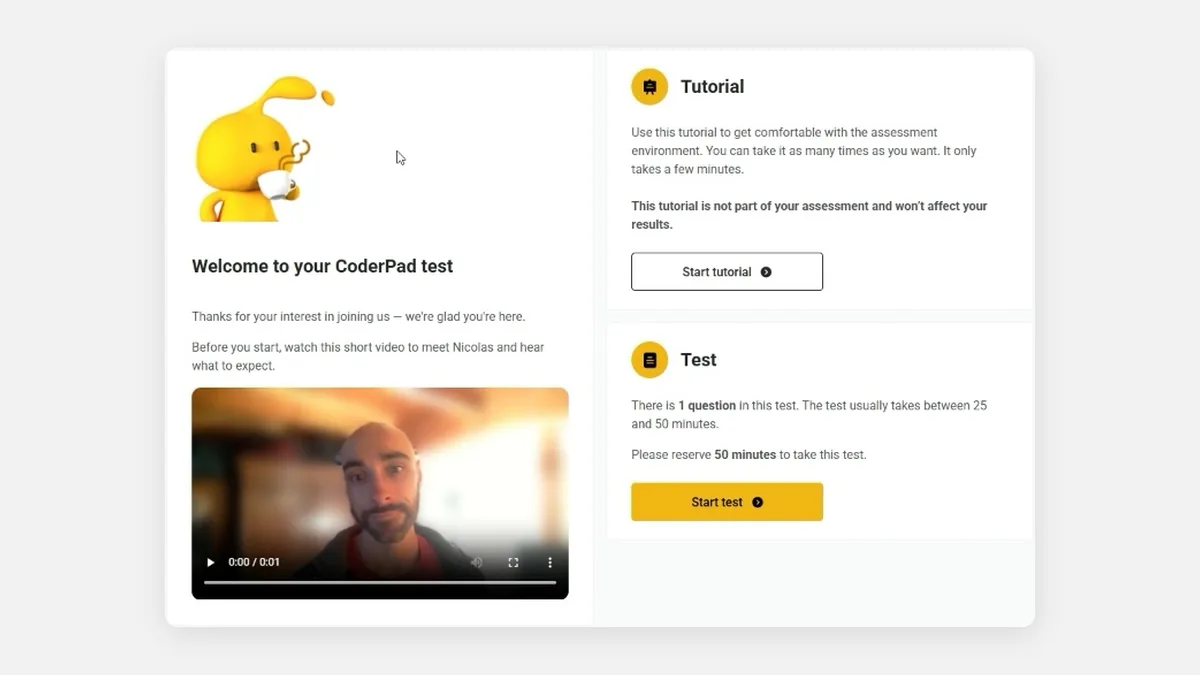
Welcome candidates with a personal video
Put a face to your team before the test starts. Add a short video to your test's welcome and end pages from its communication settings: a warm first impression when the test is a candidate's first contact with your company.
What's happening in the industry
AI skills are spreading beyond engineering
Technical skills now matter in almost every role, and a wrong hire outside engineering costs just as much as one inside it.
Kyle & Co × CoderPad research
Nearly every role is technical now
In the Kyle & Co x CoderPad survey of 271 HR and TA leaders, 93% say nearly every role now carries a technical skill requirement. Yet only about 1 in 3 employers assess skills outside engineering.
Read The Raw Materials reportIntelligent Conversations
A bad sales hire costs up to $220K
Intelligent Conversations puts the direct cost of one bad sales hire at $160K–$220K on a $120K base, before lost deals and team drag. As sales roles turn technical, proof of skill matters beyond engineering.
Read the cost of a bad sales hireWebinars and events
Upcoming CoderPad webinar: November 12
CoderPad's next live webinar is on Thursday, November 12 at 1:45 PM ET.
12Nov
Live webinar · 1:45 PM ET
How Top Talent Teams Spot Real Skill in the AI Era
New Kyle & Co research from 271 HR and TA leaders: the teams that hire best set clear AI rules, watch candidates do real work, and assess beyond engineering. With Kyle Lagunas (Kyle & Co), Vivian Chen (Lyft) and Catherine Wood Hill (CoderPad). 45 minutes, with live Q&A.
Ready to change how you hire?
Let us do the heavy lifting
CoderPad Transform puts our hiring experts to work with your team: we build your interview content, train your interviewers and run the rollout with you, with a named CSM and reviews at 30, 60 and 90 days.
Hiring for real skills across more roles means new content, new training and a new process. Most teams know what they want but don't have time to build it while running a full pipeline. That's what Transform is for.
What a program includesHide details
- Custom interview content: questions built for your roles and your stack, each with starter code, instructions, a rubric, a solution and notes.
- Interview training: live sessions by role, plus train-the-trainer so your team can run future sessions on its own.
- Change management: a rollout plan, communication templates and champion enablement.
- AI and feature enablement: a dedicated session on what matters most to your team, such as AI Assist, AI Notetaker or structured scoring.
- Enablement materials: a custom interviewer guide, hiring manager playbook and launch FAQ that are yours to keep.
- Managed support: a named CSM through the 90-day adoption window, with reviews at 30, 60 and 90 days.
Onboarding gets one team live. Transform is for when you want us to do the work with you, not just show you how. Ask your CSM to scope a program.
Thanks for being a part of the CoderPad community.
The CoderPad Team