JavaScript Online Coding Test
- Junior, senior or expert
- Question bank or custom questions
- Updated
A CoderPad JavaScript coding test is an online test you build in CoderPad Screen with questions on closures, async code and array methods, from the CoderPad question bank or your own, at junior, senior or expert level. Every answer is scored, with a replay of how the candidate wrote it.
What can your JavaScript coding test cover?
The CoderPad question bank includes JavaScript questions on scope, closures, promises and type coercion, suited to front-end, full-stack and Node.js developers. Build your test from these questions, your own, or both. Junior questions check the difference between let and var, and expert questions cover the event loop and hoisting.
| JavaScript skills to assess |
|
|---|---|
| Jobs using JavaScript |
|
| Question types | Multiple choice, coding exercises |
| Levels | Junior, Senior, Expert |
| Questions | From the CoderPad question bank, your own questions, or both |
| Test length | Set by the questions you choose |
Sign up free to explore the question bank and try the candidate experience
Sample JavaScript coding question: Temperature closest to zero
Analyze a set of temperature readings to find the one closest to zero. Implement the JavaScript function closestToZero so it returns the temperature in the array ts that is closest to 0.
- If ts is empty, return 0.
- If two readings are equally close to zero, return the positive one. For example, if ts contains -5 and 5, return 5.
- Temperatures are floating point numbers from -273 to 5526.
- ts is always a valid array and is never null.
function closestToZero(ts)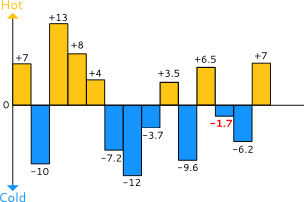
What a good solution shows
- Returns 0 for an empty array before reading any element.
- Compares absolute values and returns the positive reading on a tie, such as 5 over -5.
- Reads each value once, so the JavaScript function stays fast on large arrays.
How is a JavaScript coding test scored?
CoderPad Screen auto-grades each candidate's answers and gives you a scored report. The report shows each candidate's strengths and weaknesses and compares their skills with others who took similar assessments.
Code playback shows how each candidate thinks:
- See how they approach a problem and build their solution.
- Note areas to explore further in later interviews.
- Spot questionable or concerning behavior.
How CoderPad prevents cheating in JavaScript tests
Copy/paste tracking flags JavaScript answers that were pasted in rather than typed. To confirm they understand it, add a video follow-up question that asks them to explain their solution and the main decisions behind it.
Code playback
See how candidates wrote their code or text.
Plagiarism detection
Flags when a previous candidate's exact code is reused.
Copy/paste tracking
Shows when code may have come from elsewhere.
AI follow-up questions
Check candidates understand their code.
See how video questions work See all cheating prevention features
How building a JavaScript coding test works
Build the test
Pick JavaScript questions from the CoderPad question bank, write your own, or combine both.
Invite candidates
Send each candidate a link to the test by email.
Candidates take the test
They code in the browser, with nothing to install.
Review results
Read the scored report and watch the code playback.
Create and send coding assessments in 60 seconds, even if you're not techy. Choose the level and the number of questions, and add your own coding exercises whenever you need them.
How do you test JavaScript skills before hiring?
Check JavaScript skills in three steps: a short coding test, a review of JavaScript the candidate has shipped, and a live round on async bugs. A resume that lists React and Node doesn't show how well someone handles closures.
Questions to ask and signals to look for at each step:
Portfolio
Ask for a JavaScript project with Jest or Mocha tests and an ESLint config. These signal code written for a team.
Code on GitHub
Published npm packages and pull requests that fix async bugs are strong signals.
Coding test level
Use the junior level for junior hires and the expert level for leads who own performance or architecture.
Live interview
The fix-the-code exercises in CoderPad's JavaScript interview questions, such as if (x = 5), work well live.
JavaScript interview questions 5 ways to test developers' skills before hiring
How should you screen JavaScript candidates?
- Send the JavaScript test right after the resume review, so engineers only meet candidates who passed it.
- Choose how many questions to include so the test fits the role and the candidate's time.
- Say in the job ad that candidates will write and debug JavaScript in an online test.
We had no unified approach or tool to assess technical ability. Today, CoderPad Screen enables us to test against a wide selection of languages and is continually updated.
Trusted by 4,000+ customers worldwide
Security and compliance
SSO / SAML
Okta, Azure AD, Google and other SAML 2.0 providers, on the Enterprise plan.
SOC 2 Type 2
SOC 2 Type 2 report available.
GDPR compliant
GDPR and CCPA compliant.