---
title: "Web Components 101: Framework Comparison | CoderPad"
description: "Lit’s lightweightness, paired with web component’s abilities to integrate between multiple frameworks is an incredible one-two punch that makes it a strong candidate for any shared component system."
canonical: "https://coderpad.io/blog/development/web-components-101-framework-comparison/"
last_modified: "2023-06-05 14:38:16"
---
[Back to blog](https://coderpad.io/blog/)
# Web Components 101: Framework Comparison
December 2, 2021 7 Minute Read
By Corbin Crutchley
[Development](https://coderpad.io/blog/development/)
Alright alright, I know for a lot of the last article seemed like a big ad for Lit. That said, I promise I’m not unable to see the advantages of other frameworks. Lit is a tool in a web developer’s toolbox. Like any tool, it has its pros and cons: times when it’s the right tool for the job, and other times when it’s less so.
That said, I’d argue that using an existing framework is more often the better tool for the job than vanilla web components.
To showcase this, let’s walk through some of these frameworks and compare and contrast them to home-growing web components.
## Learn how to run front-end developer interviews that don’t suck
[Read our guide](https://coderpad.io/blog/interviewing/5-tips-for-interviewing-frontend/)
## Pros and Cons of Vanilla Web Components
While web frameworks are the hot new jazz – it’s not like we couldn’t make web applications before them. With the advent of W3C standardized web components (without Lit), doing so today is better than it’s ever been.
Here are some pros and cons of Vanilla JavaScript web components:
Pros | Cons
- No framework knowledge required
- Less reliance on framework
- Maintenance
- Bugs
- Security issues
- Smaller “hello world” size
- More control over render behavior
- Re-rendering un-needed elements is slow
- Handling event passing is tricky
- Creating elements can be overly verbose
- Binding to props requires element query
- You’ll end up building Lit, anyway
To the vanilla way of doing things’ credit, there’s a bit of catharsis knowing that you’re relying on a smaller pool of upstream resources. There’s also a lessened likelihood of some bad push to NPM from someone on the Lit team breaking your build.
Likewise – for smaller apps – you’re likely to end up with a smaller output bundle. That’s a huge win!
For smaller applications where performance is critical, or simply for the instances where you need to be as close to the DOM as possible, vanilla web components can be the way to go.
That said, it’s not all roses. After all, this series has already demonstrated that things like event passing and prop binding are verbose compared to Lit. Plus, things may not be as good as they seem when it comes to performance.
### Incremental Rendering
On top of the aforementioned issues with avoiding a framework like Lit, something we haven’t talked about much is incremental rendering. A great example of this would come into play if we had an array of items we wanted to render, and weren’t using Lit.
Every time we needed to add a single item to that list, our`innerHTML`trick would end up constructing a new element for every single item in the list. What’s worse is that every subelement would render as well!
This means that if you have an element like this:
```
Go to this location
Code language: HTML, XML (xml)
```
And only needed to update the text for a single item in the list, you’d end up creating 4 more elements for the item you wanted to update… On top of recreating the 5 nodes (including the [Text Node](https://developer.mozilla.org/en-US/docs/Web/API/Text)) for every other item in the list.
### Building Your Own Framework
As a result of the downsides mentioned, many that choose to utilize vanilla web components often end up bootstrapping their own home-grown version of Lit.
Here’s the problem with that: You’ll end up writing Lit yourself, sure, but with none of the upsides of an existing framework.
This is the problem with diving headlong into vanilla web components on their own. Even in our small examples in the article dedicated to vanilla web components, we emulated many of the patterns found within Lit. Take this code from the article:
```
Code language: HTML, XML (xml)
```
Here, we’re writing our own`clear`logic, handling dynamic value updates, and more.
The obvious problem is that we’d then have to copy and paste most of this logic in many components in our app. But let’s say that we were dedicated to this choice, and broke it out into a class that we could then extend.
Heck, let’s even add in some getters and setters to make managing state easier:
```
Code language: HTML, XML (xml)
```
Now our usage should look fairly simple!
```
Code language: HTML, XML (xml)
```
That’s only 13 lines to declare a UI component!
Only now you have a bug with namespace collision of state with underscores, your`doRender`doesn’t handle async functions, and you still have many of the downsides listed below!
You could work on fixing these, but ultimately, you’ve created a basis of what Lit looks like today, but now you’re starting at square one. No ecosystem on your side, no upstream maintainers to lean on.
## Pros and Cons of Lit Framework
With the downsides (and upsides) of vanilla web components in mind, let’s compare the pros and cons of what building components using Lit looks like:
Pros | Cons
- Faster re-renders* that are automatically handled
- More consolidated UI/logic
- More advanced tools after mastery
- Smaller footprint than other frameworks
- Framework knowledge required
- Future breaking changes
- Not as widely known/used as other frameworks (Vue, React, Angular)
While there is some overlap between this list of pros and cons and the one for avoiding Lit in favor of home-growing, there’s a few other items here.
Namely, this table highlights the fact that Lit isn’t the only framework for building web components. There’s huge alternatives like React, Vue, and Angular. These ecosystems have wider adoption and knowledge than Lit, which may make training a team to use Lit more difficult.
However, Lit has a key advantage over them, ignoring being able to output to web components for a moment – we’ll come back to that.
Even compared to other frameworks, Lit is uniquely lightweight.
Compare the bundle sizes of Vue – a lightweight framework in it’s own right – compared to Lit.
[](https://bundlephobia.com/scan-results?packages=vue@3.2.14,lit@2.0.0)
While tree shaking will drastically reduce the bundle size of Vue for smaller applications, Lit will still likely win out for a simple component system.
## Other Frameworks
Lit framework isn’t alone in being able to output to web components, however. In recent years, other frameworks have explored and implemented various methods of writing code for a framework that outputs to web components.
For example, the following frameworks have official support for creating web components without changing implementation code:
- [Vue](https://v3.vuejs.org/guide/web-components.html#definecustomelement)
- [Angular](https://angular.io/guide/elements)
- [Preact](https://github.com/preactjs/preact-custom-element)
Vue 3, in particular, has made massive strides in improving the web component development experience for their users.
What’s more is that these tools tend to have significantly larger ecosystems. Take Vue for example.
Want the ability to change pages easily? [Vue Router](https://router.vuejs.org/)
Want a global store solution? [Vuex](https://vuex.vuejs.org/) Prefer similar class based components? [Vue Class Component Library](https://class-component.vuejs.org/)
Prebuilt UI components? [Ant Design](https://www.antdv.com/docs/vue/introduce/)
While some ecosystem tools might exist in Lit, they certainly don’t have the same breadth.
That’s not to say it’s all good in the general web component ecosystem. Some frameworks, like React, [have issues with Web Component interop](https://custom-elements-everywhere.com/), that may impact your ability to merge those tools together.
## Why Web Components?
You may be asking – if you’re going to use a framework like Vue or React anyway, why even bother with web components? Couldn’t you instead write an app in one of those frameworks, without utilizing web components?
You absolutely can, and to be honest – this is how most apps that use these frameworks are built.
But web components play a special role in companies that have multiple different projects: Consolidation.
Let’s say that you work for BigCorp – the biggest corporation in Corpville.
BigCorp has dozens and dozens of full-scale applications, and not all of them are using the same frontend framework. This might sound irresponsible of BigCorp’s system architects, but in reality, sometimes a framework is better geared towards specific applications. Additionally, maybe some of the apps were part of an acquisition or merger that brought them into the company.
After all, the user doesn’t care (or often, know) about what framework a tool is built with. You know what a user does care about? The fact that each app in a collection all have vastly different UIs and buttons.
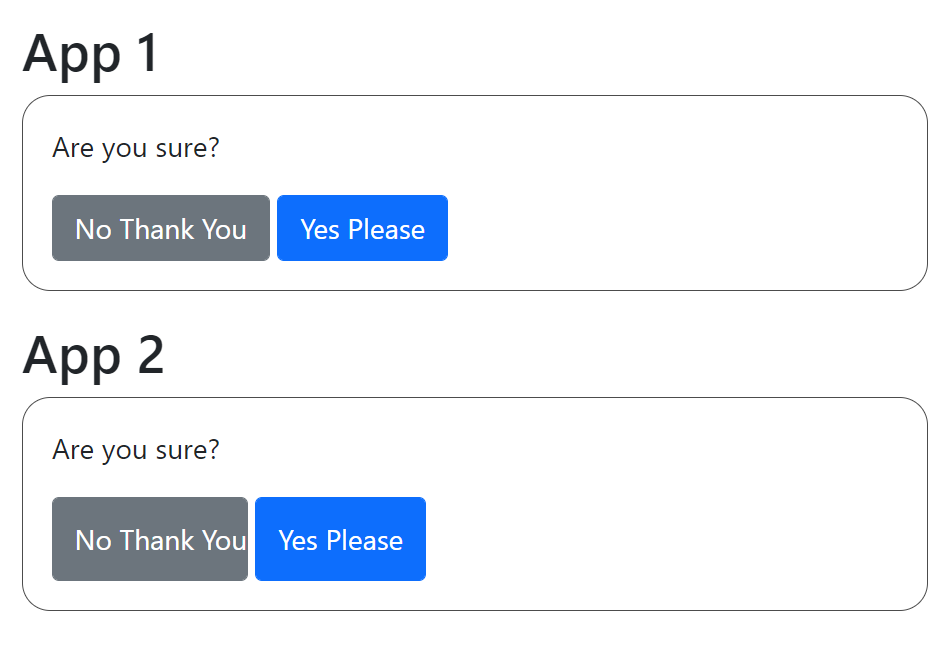
While this is clearly a bug, if both codebases implement the buttons on their own, you’ll inevitably end up with these types of problems; this being on top of the work-hours your teams have to spend redoing one-another’s work for their respective frameworks.
And that’s all ignoring how difficult it can be to get designers to have consistency between different project’s design components – like buttons.
Web Components solve this problem.
If you build a shared component system that exports web components, you can then use the same codebase across multiple frameworks.
Once the code is written and exported into web components, it’s trivial to utilize these new web components in your application. Like, it can be a [single line of code trivial.](https://v3.vuejs.org/guide/web-components.html#tips-for-a-vue-custom-elements-library)
From this point, you’re able to make sure the logic and styling of these components are made consistent between applications – even if different frameworks.
## Conclusion
While web components have had a long time in the oven, they came out swinging! And while Lit isn’t the only one at the table, they’ve certainly found a strong foothold in capabilities.
Lit’s lightweightness, paired with web component’s abilities to integrate between multiple frameworks is an incredible one-two punch that makes it a strong candidate for any shared component system.
What’s more, the ability to transfer knowledge from other frameworks makes it an easy tool to place in your toolbox for usage either now or in the future.
Regardless; whether you’re using Vue, React, Angular, Lit, Vanilla Web Components, or anything else, we wish you happy engineering!
## Subscribe for more CoderPad insights
## Trending Articles
Previous slide Next slide [Development
## What is Prompt Engineering?
Introducing AI tools such as ChatGPT and Bard helps increase the efficiency of tasks such as data generation, code generation and completion, text summarization, etc. How were these AI tools trained to answer almost every question you ask them? The answer, prompt engineering, is discussed in this blog post.
Read the post](https://coderpad.io/blog/development/what-is-prompt-engineering/) [Development
## A Guide To Using React’s useCallback() Hook
Are you looking to optimize your React applications? Have you heard of the useCallback hook? useCallback is a powerful React hook that helps you optimize your application by preventing unnecessary re-renders. In this post, we'll dive into React's useCallback() hook, define referential equality and callback functions and how to tie it all together.
Read the post](https://coderpad.io/blog/development/a-guide-to-using-reacts-usecallback-hook/) [Development
## MySQL vs. PostgreSQL: How Do They Compare?
A database is a convenient tool that allows users to access information, maintain records, and apply commonly used operations, such as insertion, modification, deletion, and data organization. Learn about MySQL vs PostgreSQL, their features, advantages, and disadvantages. Finally, check out which one is the best choice for you.
Read the post](https://coderpad.io/blog/development/mysql-vs-postgresql-how-do-they-compare/) [Development
## PostgreSQL LIKE Operator: A Detailed Guide
When using databases, searching for values that match a given pattern is a familiar necessity. Learn how you can retrieve entries with queries including a particular string using Postgres LIKE operator.
Read the post](https://coderpad.io/blog/development/postgresql-like-operator-a-detailed-guide/) [Development
## How To Use DataProvider In TestNG With Examples
When it comes to testing there are many tools and techniques available. In this post, we'll discuss how to use DataProvider with TestNG.
Read the post](https://coderpad.io/blog/development/how-to-use-dataprovider-in-testng-with-examples/) [Development
## How To Get Up And Running With Django Migrations: A Guide
Django migrations are a way of handling the application of changes to a database schema. By following the steps outlined in this guide, you can easily set up and use migrations in your Django projects.
Read the post](https://coderpad.io/blog/development/how-to-get-up-and-running-with-django-migrations-a-guide/) [Development
## Writing A Parameterized Test In JUnit With Examples
A JUnit parameterized test allows you to decouple data from structure, generating cleaner and more reliable tests. Learn more in this guide.
Read the post](https://coderpad.io/blog/development/writing-a-parameterized-test-in-junit-with-examples/) [Development
## How To Use Assert In JUnit With Examples
The JUnit Assert class is what you use to write unit testing assertions in JUnit. Learn more about it in this guide, full of examples.
Read the post](https://coderpad.io/blog/development/how-to-use-assert-in-junit-with-examples/) [Development
## A Simple Guide To TypeORM: What It Is And How To Use It
Considering current languages have object-oriented programming features, most database management systems are based on the relational model, with tables instead of objects. For these reasons, mapping relational objects is very important in development. In this article, you will learn what TypeORM, one of the main tools used today, is.
Read the post](https://coderpad.io/blog/development/a-simple-guide-to-typeorm-what-it-is-and-how-to-use-it/) [Development
## Using PreparedStatement in JDBC With Examples
In this post, we'll see why and how to work with JDBC and PreparedStatement. We will also learn along with examples using code.
Read the post](https://coderpad.io/blog/development/using-preparedstatement-in-jdbc-with-examples/) [Development
## React vs React Native: The Differences Explained
React and React Native are similar in that they both allow web developers to build applications based on the unique concept of components. But the two frameworks do this in radically different ways. In this post, we cover the key differences between react and react native frameworks, implementation, and which is an appropriate choice.
Read the post](https://coderpad.io/blog/development/react-vs-react-native-the-differences-explained/) [Development
## Logging in Django
The most challenging part of fixing a problem is identifying it. Unfortunately, this statement is exceptionally true when it comes to debugging. Learn how to use the power of logging into your Django applications to improve your debug process in this article.
Read the post](https://coderpad.io/blog/development/logging-in-django/)
## Hire with confidence.
See why engineering teams trust CoderPad to evaluate developers with realistic, AI-ready hiring workflows.
[Request a demo](https://coderpad.io/sales/)