---
title: "Master React Unidirectional Data Flow | CoderPad"
description: "Understanding React unidirectional data flow is integral to scaffolding scalable applications."
canonical: "https://coderpad.io/blog/development/master-react-unidirectional-data-flow/"
last_modified: "2023-06-07 14:18:09"
---
[Back to blog](https://coderpad.io/blog/)
# Master React Unidirectional Data Flow
April 27, 2021 4 Minute Read
By Corbin Crutchley
[Development](https://coderpad.io/blog/development/)
As with any form of programming, there are dozens of ways to manage data inside a React application. That said, not all methods are equally capable of scaling. There are some “suggested patterns” for your React applications to follow that will ensure you’re not forced to pause in order to reorganize or re-evaluate your existing code when you’re building the application.
Today, we’ll be covering one of the most important structural best practices to follow when building your React applications: Unidirectional data flow.
## What is Unidirectional Data Flow?
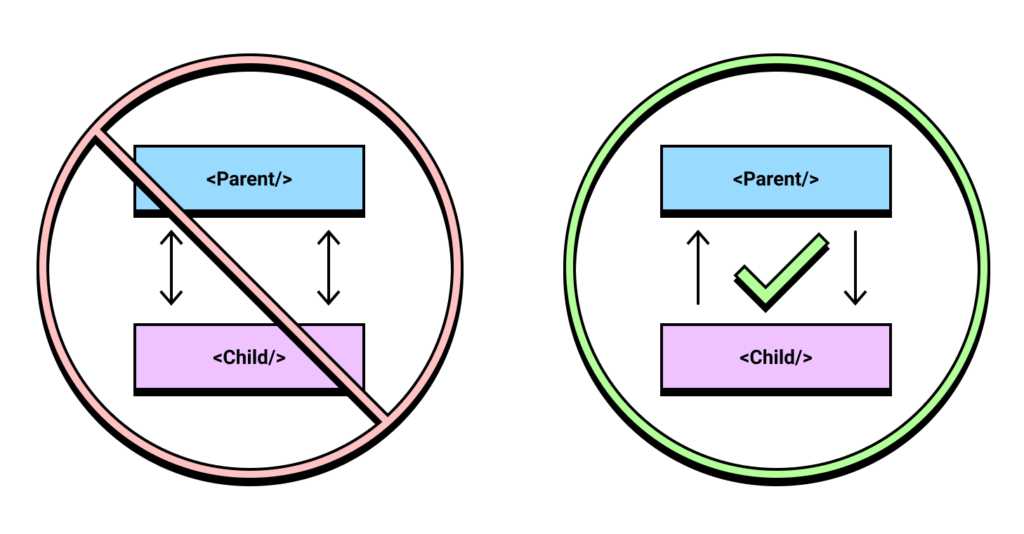
Unidirectional data flow is the idea that components should only receiveraise data in one direction. Child components should only call functions from parent components, while parent components should only set/pass data to their children.
[](https://coderpad.io/wp-content/uploads/2021/04/img_6088a07a0be12.png)
In order to explain how both of these look in real code, let’s start with how a properly unidirectional parent and child component would be written.
## Unidirectional Demo
A great example of a set of components we’ll use to demonstrate unidirectionality is a parent “App” component and a child “Form” component.
Let’s take a look at a code sample that follows this unidirectionality first:
As you can see we’re passing the onChange and value props to SimpleForm. This keeps our state consolidated inside of the App component rather than split between App and SimpleForm. Once you “submit” the form, SimpleForm calls onDone which changes the state stored inside of App. This in turn causes a re-render of SimpleForm.
While SimpleForm is displaying the data to the user, the logic itself stays within App. SimpleForm contains no state or application logic; we call components like these “dumb” components. “Dumb” components are utilized for styling and composability, but not for app logic or state.
This is what a set of proper React components should look like. This pattern of raising state out of the component itself and leaving “dumb” component comes from the guidance of the React team itself. This pattern is called [“lifting state up”](https://reactjs.org/docs/lifting-state-up.html).
Now that we have a better understanding of the patterns to follow let’s take a look at the wrong way to do things.
## Breaking from Suggested Patterns
Now that we’ve “lifted” the state, let’s drop back down into SimpleForm. We’ll start by changing SimpleForm to a class component and adding state.
```
class SimpleForm extends React.Component {
// State is now a part of the SimpleForm component
state = {
input: ""
}
onChange(e) {
this.setState({
input: e.target.value
})
}
render() {
return (
)
}
}Code language: JavaScript (javascript)
```
Now, we can use ref in App to access the class methods and state.
```
export default function App() {
const simpleRef = React.useRef()
const [displayTxt, setDisplayTxt] = React.useState("")
const class="hljs-function">() => {
// Reach into the Ref to access the state of the component instance
setDisplayTxt(simpleRef.current.state.input)
}
return (
)
}Code language: JavaScript (javascript)
```
This code works, but has some inherent complexity issues. When you start expanding this component, this idea of separating your state and having to inspect the child reference from the parent makes development more difficult. Let’s take a look visually how following the application logic is now more difficult with this pattern.
## Visualizing the Problem
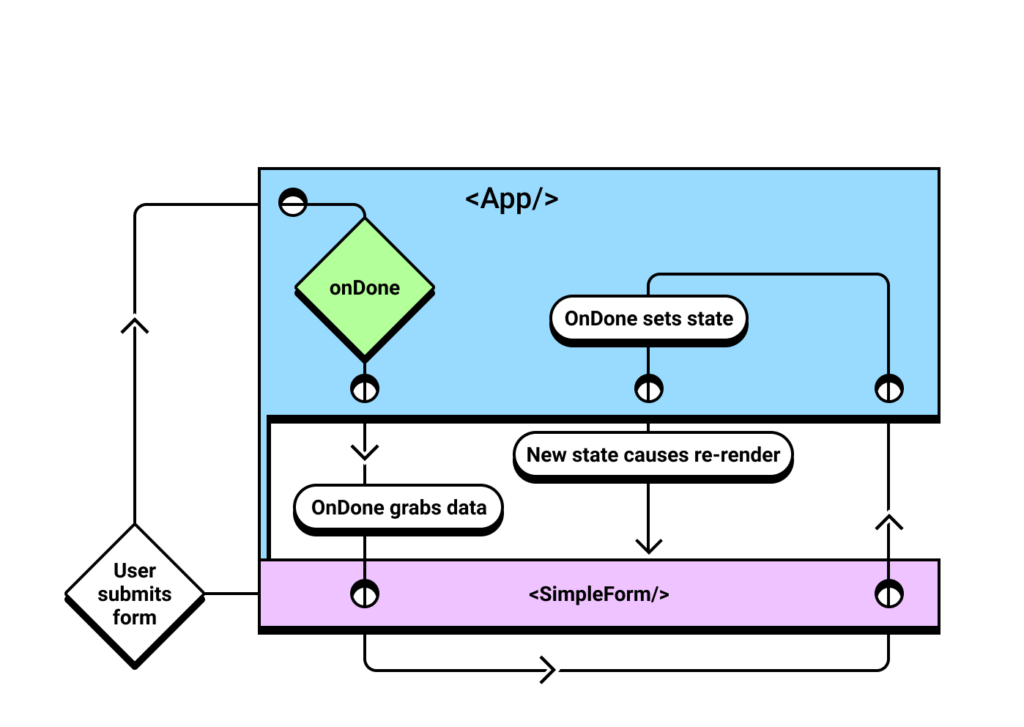
First, let’s start by taking a look at the simpleRef component, where the state is “lowered down” to the SimpleForm component:
[](https://coderpad.io/wp-content/uploads/2021/04/img_6088a07cc6cf6.png)
In this example, the flow of the application state is as follows:
- App (and its children, SimpleForm) render
- The user makes changes to the data stored in SimpleForm
- The user triggers the onDone action, which triggers a function in App
- The App onDone method inspects the data from SimpleForm
- Once the data is returned to App, it changes its own data, thus triggering a re-render of App and SimpleForm both
As you can see from the chart above and the outline of the data flow, one action goes back and forth between the parent and child as App attempts to access the data stored in SimpleForm. This is a prime example of a bi-directional component action. This code sample gets even more complex when onDone is expected to change the state in SimpleForm.
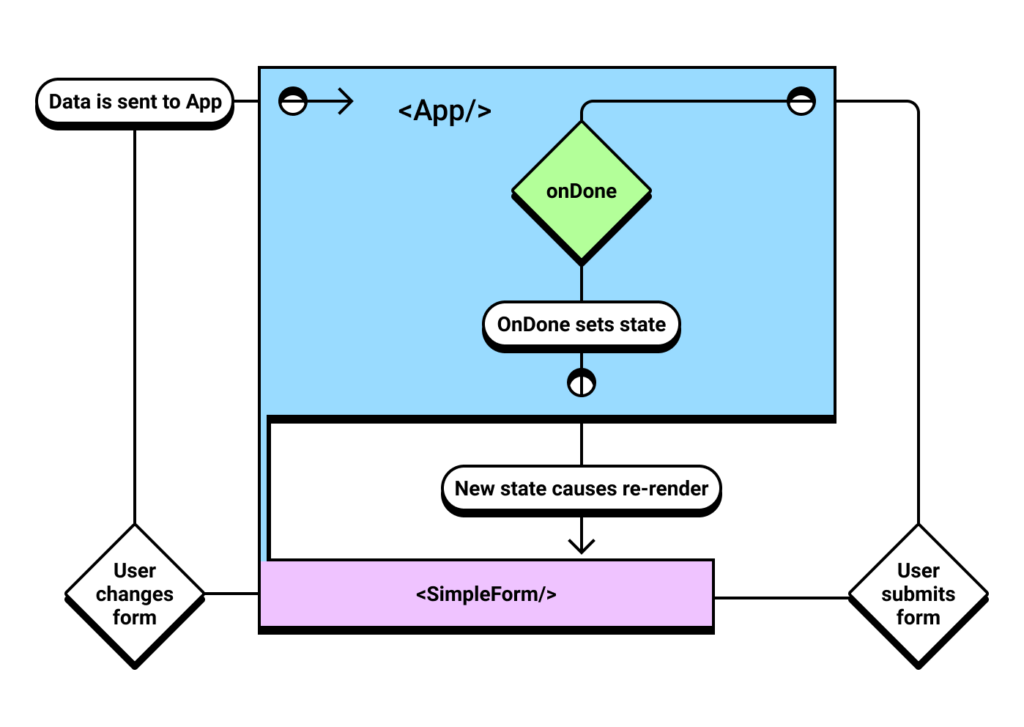
Now, let’s contrast that to the mental model needed to work with unidirectionality enforced.
[](https://coderpad.io/wp-content/uploads/2021/04/img_6088a07e1f014.png)
- App (and its children, SimpleForm) render
- The user makes changes in SimpleForm, the state is raised up to App through callbacks
- The user triggers the onDone action, which triggers a function in App
- The App onDone method already contains all of the data it needs in it’s own component, so it simply re-renders App and SimpleForm without any additional logic overhead
As you can see, while the number of steps is similar between these methods (but may not be in a less trivial example), the unidirectional flow is much more streamlined and easier to follow.
This is why the React core team (and the community at large) strongly suggests you use unidirectionality as often as possible.
## Conclusion & Challenge
Understanding React unidirectional data flow is integral to scaffolding scalable applications. Unidirectionality doesn’t just apply to React, either – Angular and Vue applications often require similar patterns for large scale codebases to be easier to follow and more performant.
Now that we have a deeper understanding of React unidirectional data flow, here’s a challenge for you: Refactor the following components to better reflect unidirectionality in this coding pad.
The functionality of the app should be consistent with the previous version. Stuck?
Start with:
- Move the getNewActivity into a React.useEffect in App
- Move the state.activity into a React.useState in App
- Pass all props to DisplayActivities, making it a “dumb” component
Still stuck? Maybe you’re excited to share your solution? [Send us a Tweet @CoderPad](https://twitter.com/CoderPad). We’d be excited to hear from you!
## Subscribe for more CoderPad insights
## Trending Articles
Previous slide Next slide [Development
## What is Prompt Engineering?
Introducing AI tools such as ChatGPT and Bard helps increase the efficiency of tasks such as data generation, code generation and completion, text summarization, etc. How were these AI tools trained to answer almost every question you ask them? The answer, prompt engineering, is discussed in this blog post.
Read the post](https://coderpad.io/blog/development/what-is-prompt-engineering/) [Development
## A Guide To Using React’s useCallback() Hook
Are you looking to optimize your React applications? Have you heard of the useCallback hook? useCallback is a powerful React hook that helps you optimize your application by preventing unnecessary re-renders. In this post, we'll dive into React's useCallback() hook, define referential equality and callback functions and how to tie it all together.
Read the post](https://coderpad.io/blog/development/a-guide-to-using-reacts-usecallback-hook/) [Development
## MySQL vs. PostgreSQL: How Do They Compare?
A database is a convenient tool that allows users to access information, maintain records, and apply commonly used operations, such as insertion, modification, deletion, and data organization. Learn about MySQL vs PostgreSQL, their features, advantages, and disadvantages. Finally, check out which one is the best choice for you.
Read the post](https://coderpad.io/blog/development/mysql-vs-postgresql-how-do-they-compare/) [Development
## PostgreSQL LIKE Operator: A Detailed Guide
When using databases, searching for values that match a given pattern is a familiar necessity. Learn how you can retrieve entries with queries including a particular string using Postgres LIKE operator.
Read the post](https://coderpad.io/blog/development/postgresql-like-operator-a-detailed-guide/) [Development
## How To Use DataProvider In TestNG With Examples
When it comes to testing there are many tools and techniques available. In this post, we'll discuss how to use DataProvider with TestNG.
Read the post](https://coderpad.io/blog/development/how-to-use-dataprovider-in-testng-with-examples/) [Development
## How To Get Up And Running With Django Migrations: A Guide
Django migrations are a way of handling the application of changes to a database schema. By following the steps outlined in this guide, you can easily set up and use migrations in your Django projects.
Read the post](https://coderpad.io/blog/development/how-to-get-up-and-running-with-django-migrations-a-guide/) [Development
## Writing A Parameterized Test In JUnit With Examples
A JUnit parameterized test allows you to decouple data from structure, generating cleaner and more reliable tests. Learn more in this guide.
Read the post](https://coderpad.io/blog/development/writing-a-parameterized-test-in-junit-with-examples/) [Development
## How To Use Assert In JUnit With Examples
The JUnit Assert class is what you use to write unit testing assertions in JUnit. Learn more about it in this guide, full of examples.
Read the post](https://coderpad.io/blog/development/how-to-use-assert-in-junit-with-examples/) [Development
## A Simple Guide To TypeORM: What It Is And How To Use It
Considering current languages have object-oriented programming features, most database management systems are based on the relational model, with tables instead of objects. For these reasons, mapping relational objects is very important in development. In this article, you will learn what TypeORM, one of the main tools used today, is.
Read the post](https://coderpad.io/blog/development/a-simple-guide-to-typeorm-what-it-is-and-how-to-use-it/) [Development
## Using PreparedStatement in JDBC With Examples
In this post, we'll see why and how to work with JDBC and PreparedStatement. We will also learn along with examples using code.
Read the post](https://coderpad.io/blog/development/using-preparedstatement-in-jdbc-with-examples/) [Development
## React vs React Native: The Differences Explained
React and React Native are similar in that they both allow web developers to build applications based on the unique concept of components. But the two frameworks do this in radically different ways. In this post, we cover the key differences between react and react native frameworks, implementation, and which is an appropriate choice.
Read the post](https://coderpad.io/blog/development/react-vs-react-native-the-differences-explained/) [Development
## Logging in Django
The most challenging part of fixing a problem is identifying it. Unfortunately, this statement is exceptionally true when it comes to debugging. Learn how to use the power of logging into your Django applications to improve your debug process in this article.
Read the post](https://coderpad.io/blog/development/logging-in-django/)
## Hire with confidence.
See why engineering teams trust CoderPad to evaluate developers with realistic, AI-ready hiring workflows.
[Request a demo](https://coderpad.io/sales/)